





Content:
Published: 31.03.2026
Views: 13
According to the Baymard Institute, a leading UX research organization that has been studying e-commerce experiences for over a decade, around 70% of users abandon their purchase after adding items to the cart. In most cases, the issue isn’t price or product selection, but the buying experience itself. A complicated checkout process, unclear delivery terms, unnecessary form fields, or mandatory account creation cause friction that drives users away.
In this article, we’ve compiled practical recommendations based on Baymard research and our experience building e-commerce solutions at Asabix. These are the principles we apply to design online stores that simplify the buying process, improve clarity, and reduce abandonment rates.
Don’t overcomplicate password requirements
Problem:
Overly complex password requirements can reduce conversion rates. The main issue typically appears not during registration, but during subsequent logins. Users may create a complex password to meet all requirements, but each additional rule makes it harder to remember and enter later. Testing of major e-commerce sites, including Amazon and ASOS, has shown that password-related issues, including password recall and password recovery, can lead to up to 18.75% of checkout abandonment.
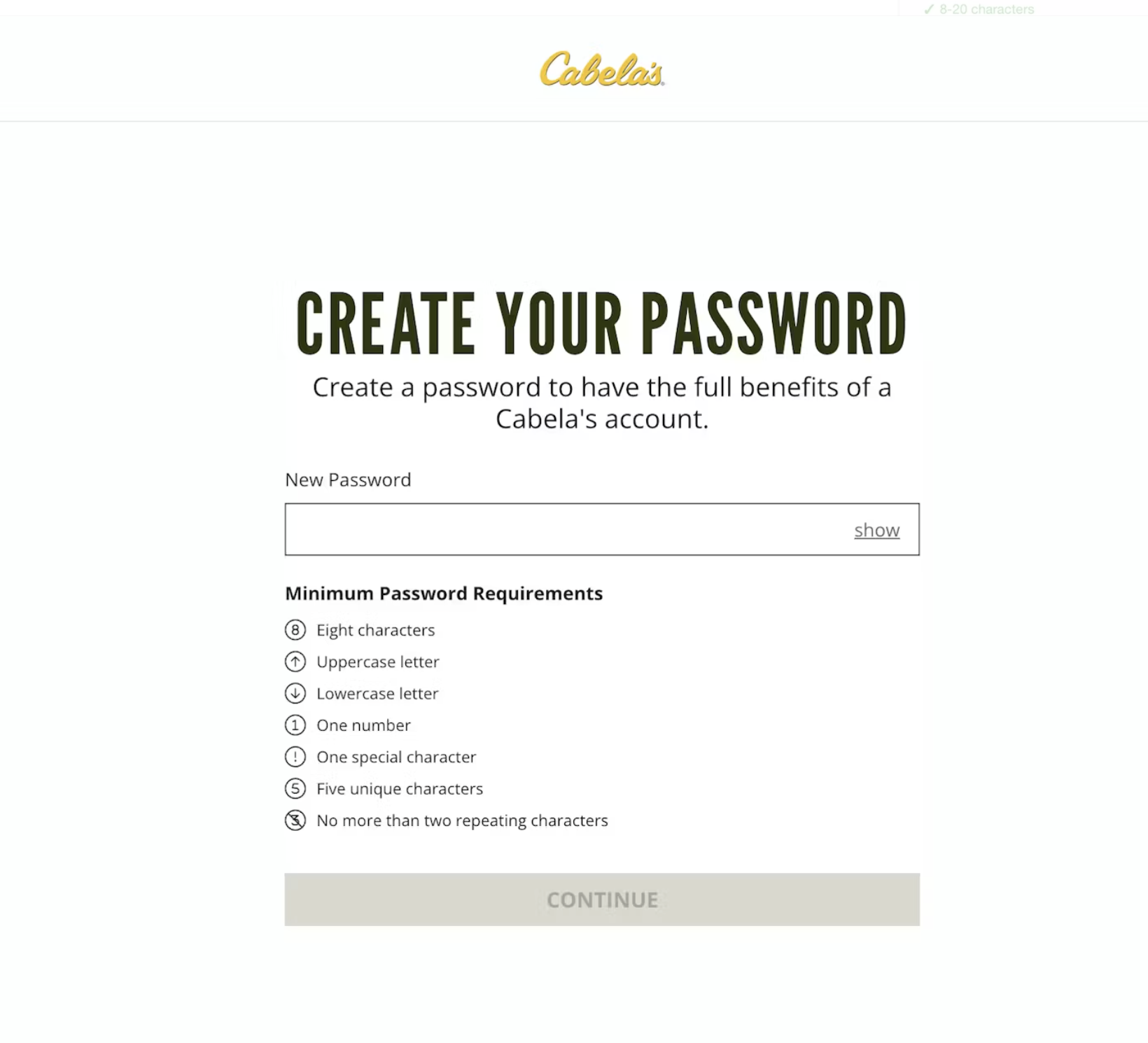
Bad example: overly complex password requirements
Solution:
Keep password rules simple; in most cases, requiring 6–8 characters is sufficient. Account security should be strengthened through other mechanisms, such as:
- automated suspicious activity detection with Google reCAPTCHA v3 (no user interaction required);
- two-factor authentication (via SMS or authenticator apps);
- login notifications for new account access.
These approaches improve security without adding unnecessary friction and do not negatively impact conversion rates.
Show delivery dates, not delivery speed
Problem:
Many e-commerce websites display delivery times as “2–3 business days” rather than a specific delivery date. As a result, users have to calculate or guess when their order will actually arrive. This creates uncertainty during checkout.
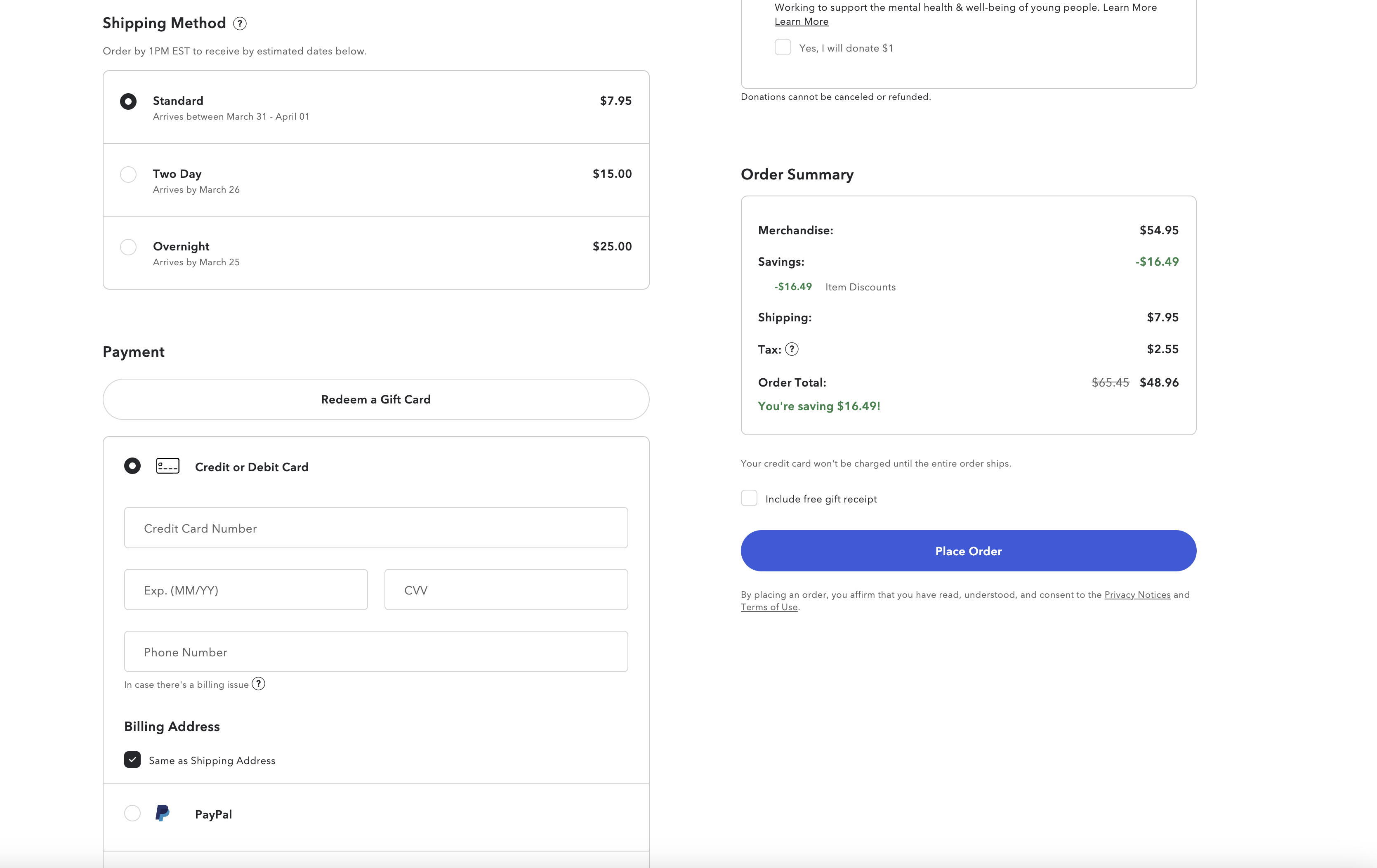
Good example: a specific delivery date is provided, so the users immediately understand when the order will arrive
Solution:
Show the expected delivery date or a narrow date range. This can be achieved using two approaches: integrating with carrier APIs or building a custom delivery calculation system. It’s important to account not only for the carrier’s transit time but also for the actual handoff time to the shipping provider, ensuring delivery estimates are accurate and realistic.
Don’t force users to log in before checkout
Problem:
According to Baymard Institute research, 1 in 4 shoppers abandon their cart because they are required to create an account or log in. The option to check out as a guest is often unclear or difficult to find.
Solution:
Make guest checkout the primary option. The button should be clearly labeled, for example: “Continue as Guest” or “Checkout without an account,” so users immediately understand they can complete the purchase without logging in.
Handle optional fields in checkout forms properly
Problem:
Many e-commerce websites display all possible form fields during checkout. Even if some of them are optional, they still force users to pause and decide whether they need to fill them in. As a result, the checkout process can take 5–30% longer.
Solution:
Display only essential fields by default, and hide optional ones until they are needed, for example, using expandable sections or dropdowns.
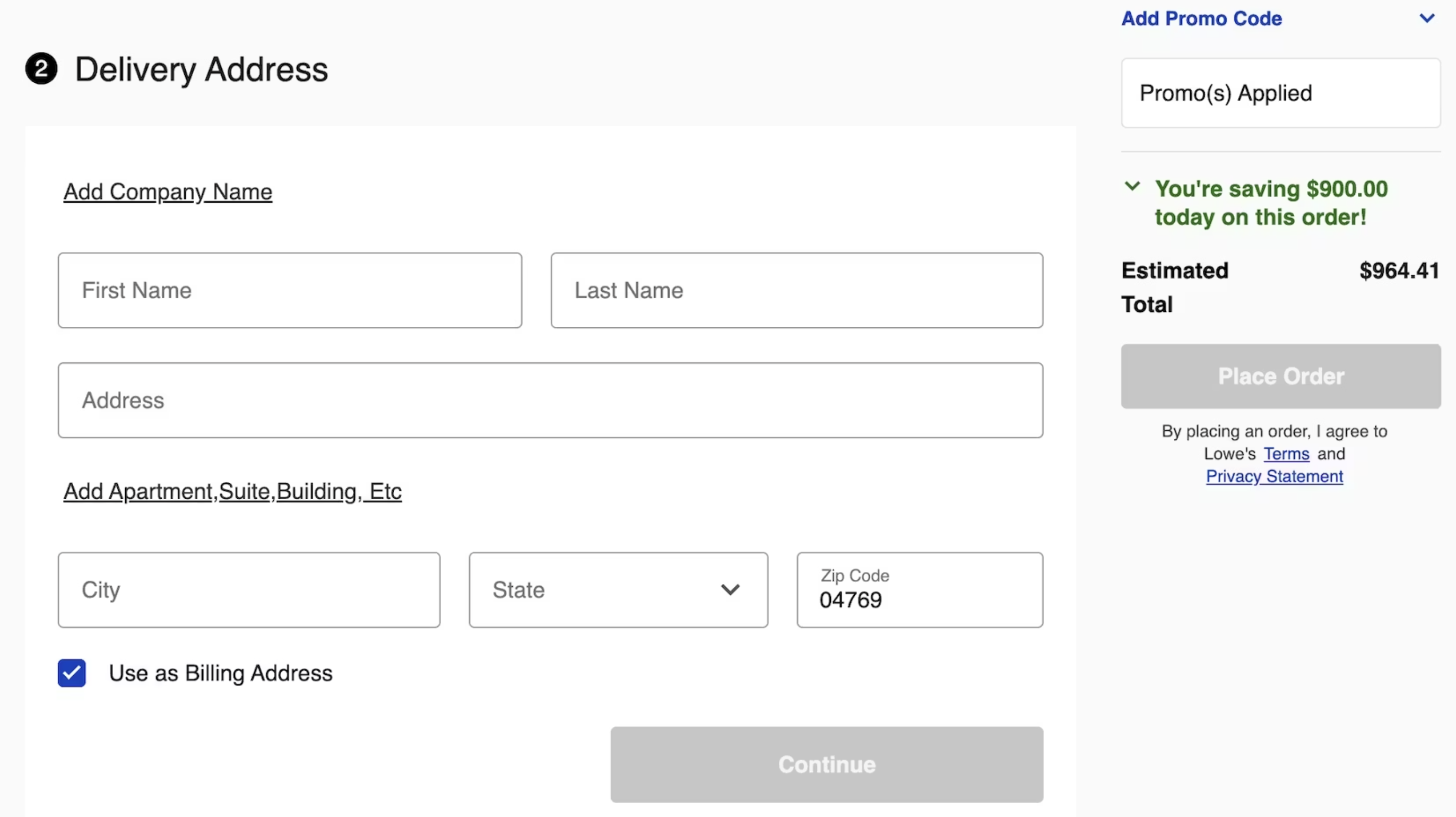
In this example, optional fields that are not relevant to all users (such as “Company Name” and “Address Line 2”) are hidden behind links; they remain accessible without cluttering the form.
Use clear and specific error messages
Problem:
Generic error messages like “Invalid input” only frustrate users. For example, a system may ask users to enter a phone number even though it has already been entered, just incorrectly. As a result, users are left guessing what went wrong.
Solution:
To avoid this issue, use adaptive (context-specific) error messages. Testing shows that detailed, actionable messages significantly reduce the time needed to fix errors and reduce the number of users who get stuck and abandon the checkout process.
For example:
- “Phone number must contain 10 digits.”
- “Email must include an ‘@’ symbol (e.g., name@example.com)”
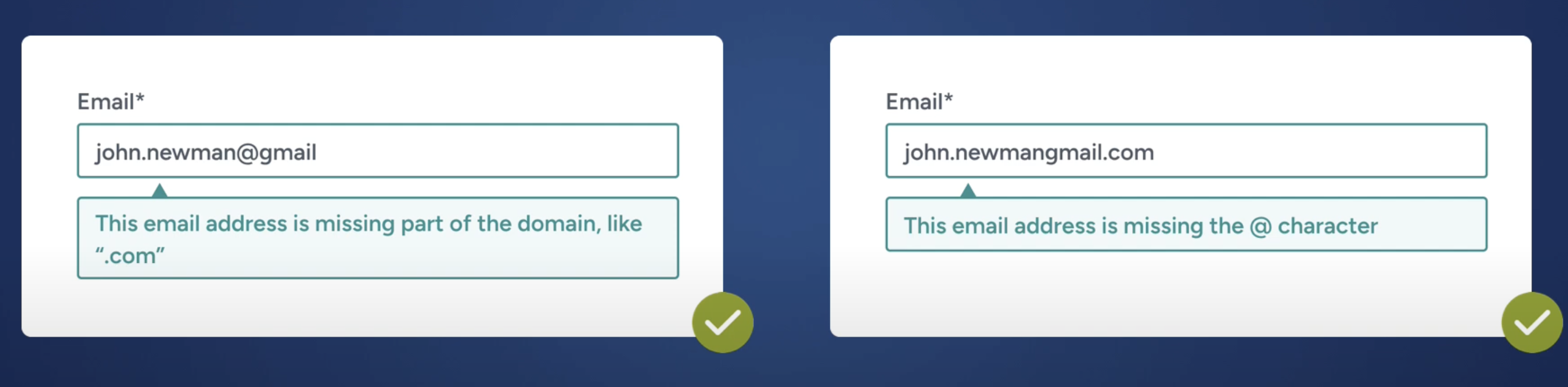
Examples of adaptive error messages
Explain why a phone number is required
Problem:
UX testing shows that over 70% of users are reluctant to provide their phone number due to privacy concerns. Many believe their number will be used for unwanted marketing. As a result, some users enter false information or abandon checkout entirely when a required field has no explanation.
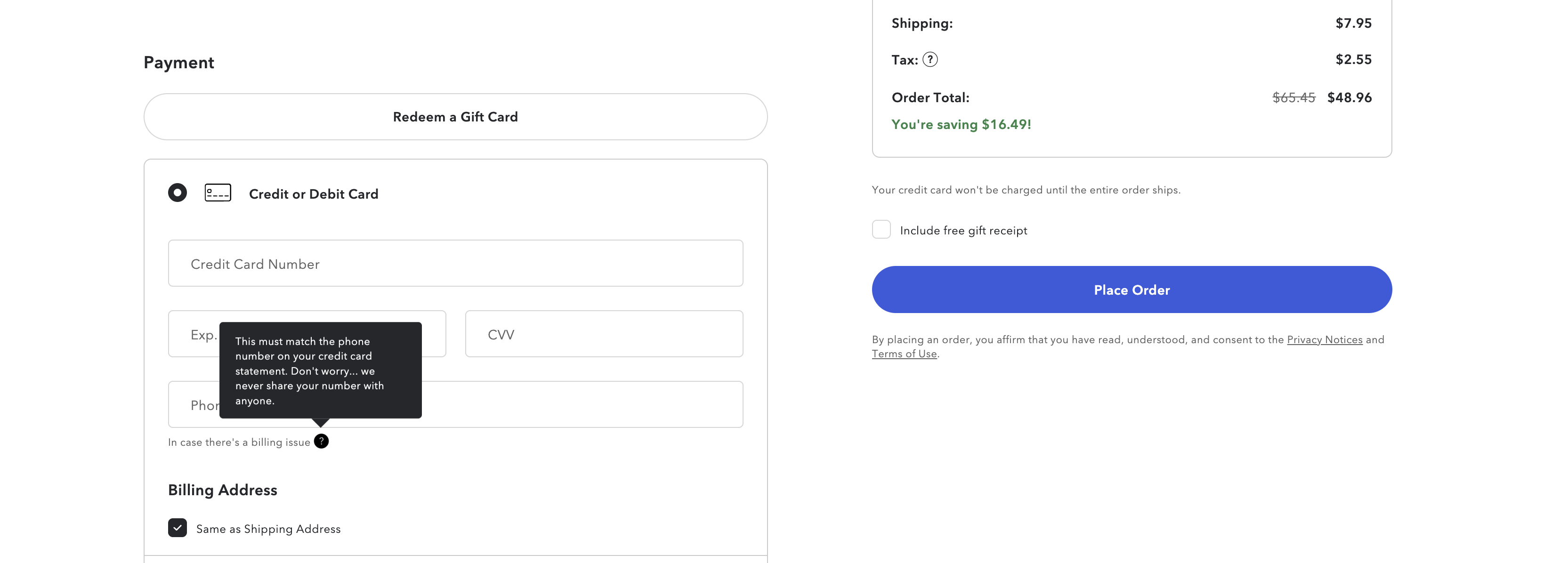
Example of a UX explanation for requiring a phone number during checkout
Solution:
Clearly explain why the phone number is needed during checkout. For example: “The phone number is required to clarify delivery details with the courier.” This increases trust and reduces abandonment.
Make return policies clear and easy to find
Problem:
Return policy information significantly impacts purchase decisions. If it’s hard to find, it reduces trust in the store.
Solution:
Display return policies where users expect to find them:
- on the product page,
- in search results,
- in the site footer.
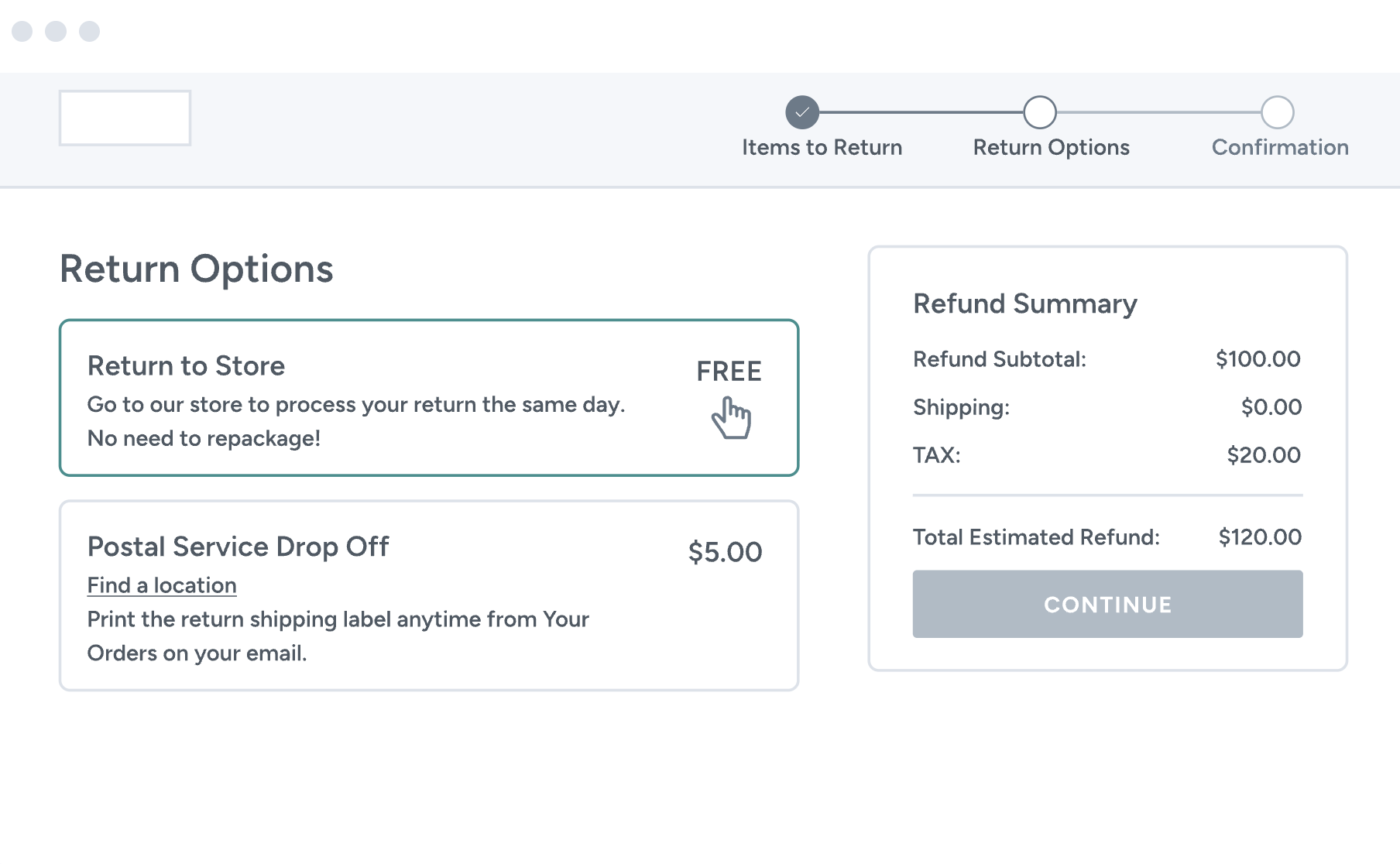
The return process itself should be simple and transparent. If your business has physical stores or pickup points, allow in-store returns. During testing, around 20% of users preferred this option.
Turn the cart into a product-saving tool
Problem:
About 48% of users use the cart to save items for later, while another 21% rely on wishlists. If these options aren’t available, users resort to workarounds like bookmarks or screenshots. That’s why the cart should be treated not only as a checkout step, but also as a product-saving tool.
Solution:
Ensure the cart persists across sessions, syncs across devices, and displays key product information directly within the cart.
Make order tracking simple and accessible
Problem:
At a minimum, an e-commerce website should include a user account as a core post-purchase tool. Around 50% of shoppers consider order tracking one of the most important account features. Users also expect to be able to return, edit, or cancel orders without contacting support.
Key user expectations for account functionality:
| Feature | % of users | What it means for business |
| Order tracking and delivery status | 50% | Must be easily accessible immediately after purchase |
| Initiating returns | 26% | Users expect self-service without contacting support |
| Editing or updating orders | 19% | Flexibility is required after checkout |
| Canceling orders | 15% | Users expect control at early stages |
| Managing payment methods | 38% | Trust in payment handling impacts repeat purchases |
Solution:
Make order tracking a centralized feature of the user account. Provide real-time delivery updates, avoid hiding information in emails, and allow users to manage orders in a single interface.
Enable users to cancel, edit, or return orders without contacting support. This reduces frustration and aligns with user expectations for self-service.
Use free shipping thresholds
Problem:
Many users are willing to add extra items to their cart to avoid paying for shipping. In fact, 52% of shoppers pause checkout to add products or find what’s needed to qualify for free shipping.
Solution:
First, implement a free shipping threshold. Then clearly communicate it across all key touchpoints: the homepage, product pages, the cart, and during checkout. It’s also helpful to show progress toward free shipping, for example: “Add $20 more to get free shipping.”
Add automated size recommendations
Problem:
Most online stores still rely on standard size charts that don’t account for individual body characteristics or the fit of a specific item. As a result, users have to interpret this information themselves, which often leads to incorrect size selection and, ultimately, product returns.
Solution:
A more effective approach is automated size recommendations. In such systems, users provide their parameters (such as height, weight, body type, or sizes from other brands), and the algorithm analyzes this data along with product attributes to recommend the most suitable size. In ASABIX projects, implementing this functionality has reduced return rates by up to 75%, as users make more accurate size choices at the purchase stage.
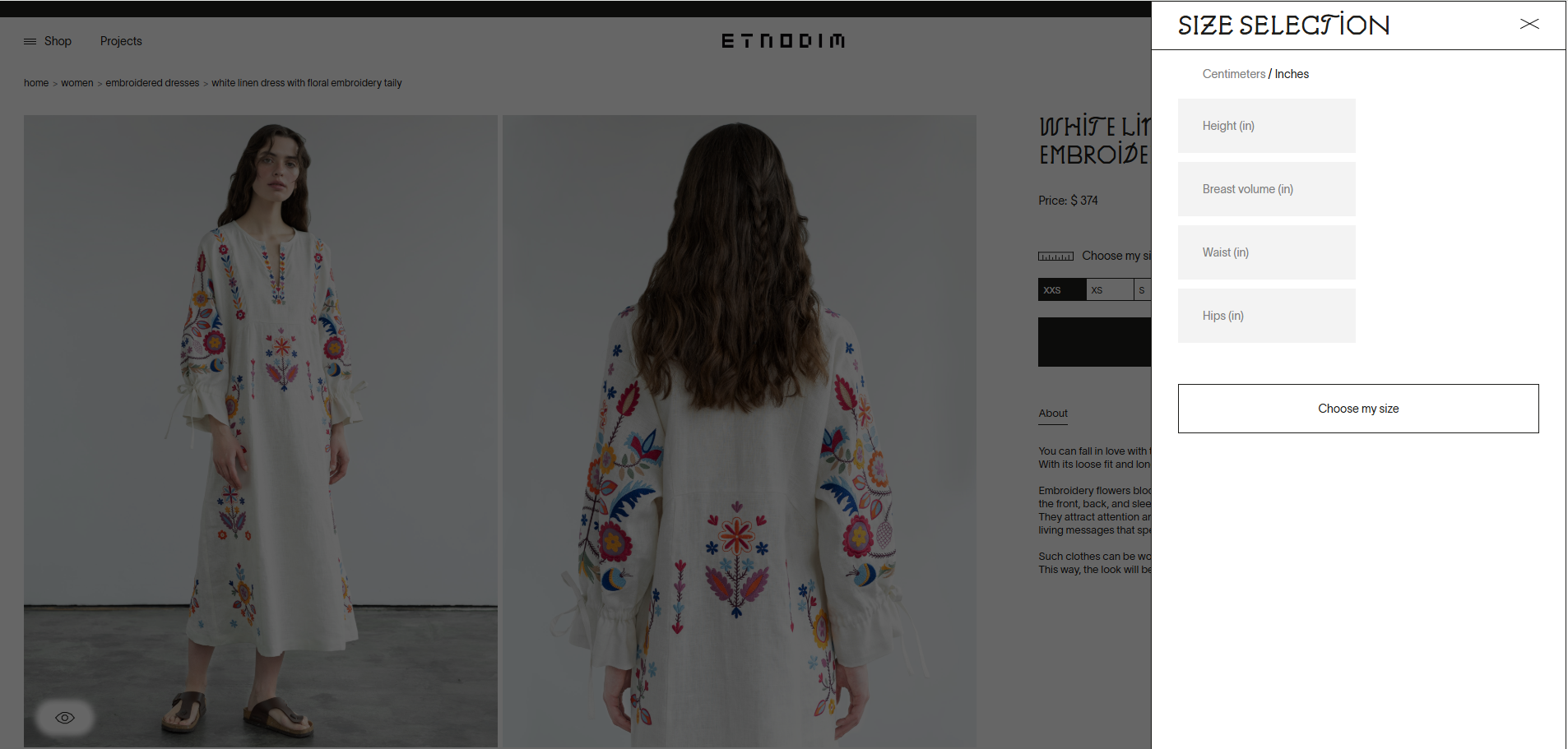
Example of automated size recommendation based on user parameters
Need an online store that actually sells?
The Asabix team has been building e-commerce solutions since 2017. We create online stores that go beyond design, focusing on real user behavior, checkout UX, and business performance metrics.
In our projects, we help:
- design a clear and intuitive purchase experience;
- optimize checkout to reduce cart abandonment;
- integrate payment systems, delivery, CRM, and other business tools;
- build scalable e-commerce platforms ready for growth.
Whether you’re launching a new online store or upgrading an existing one, Asabix will help you design and deliver a solution that drives real results.
Get in touch to discuss your project.
Let's discuss your project
Blog
#0000
Read more articles in our blog
What is PWA: Comprehensive Guide with Code Samples
26 Feb, 2024
Progressive Web Apps are web applications that bring best web and mobile features. PWAs are similar to native apps in functionality and can be used on any device with a web browser.
VIEW ARTICLE
-compress.jpg "Make Online Shopping Easier: How UX Impacts Customer Loyalty and Sales - Picture №5")
Outsourcing and outstaff: difference and features
20 Jul, 2023
Modern companies often have a need for fast and efficient development of software and other IT projects.
VIEW ARTICLE

Website Development Costs: What to Expect
08 Jan, 2025
Are you curious about the cost of creating a website? Discover how design intricacies, advanced functionality, and the type of site you envision can impact your budget.
VIEW ARTICLE
Why Do You Need a CRM System: Definition, Benefits, and Types
22 Feb, 2024
CRM is software for automating and managing customer interactions. Here, all data about the history of orders and sales, about each customer and his preferences, as well as about previous interactions of the brand with the consumer, are stored electronically.
VIEW ARTICLE
