




Content:

Published: 18.06.2026
Views: 945
Most failed warehouse management system (WMS) projects don't fail during implementation. They fail before it, in the weeks when nobody sat down and wrote out what the system actually needed to do. Teams skip ahead to vendor demos, focus on polished demonstrations, and only find the gaps later, when the software can't run their picking strategies or refuses to sync with the ERP. By then, the contract is signed.
This guide helps you prevent that. We'll go through the warehouse management system requirements that genuinely matter, explain how to organize them into something usable, and cover how to tell whether an off-the-shelf product will do the job or whether you're better off building your own.
What Are WMS Requirements?
WMS requirements are the documented list of functions, integrations, and performance standards your warehouse management system has to meet. They take the messy reality of your operation, how goods come in, where they sit, how orders get picked and shipped, and turn it into a spec you can hold software up against.
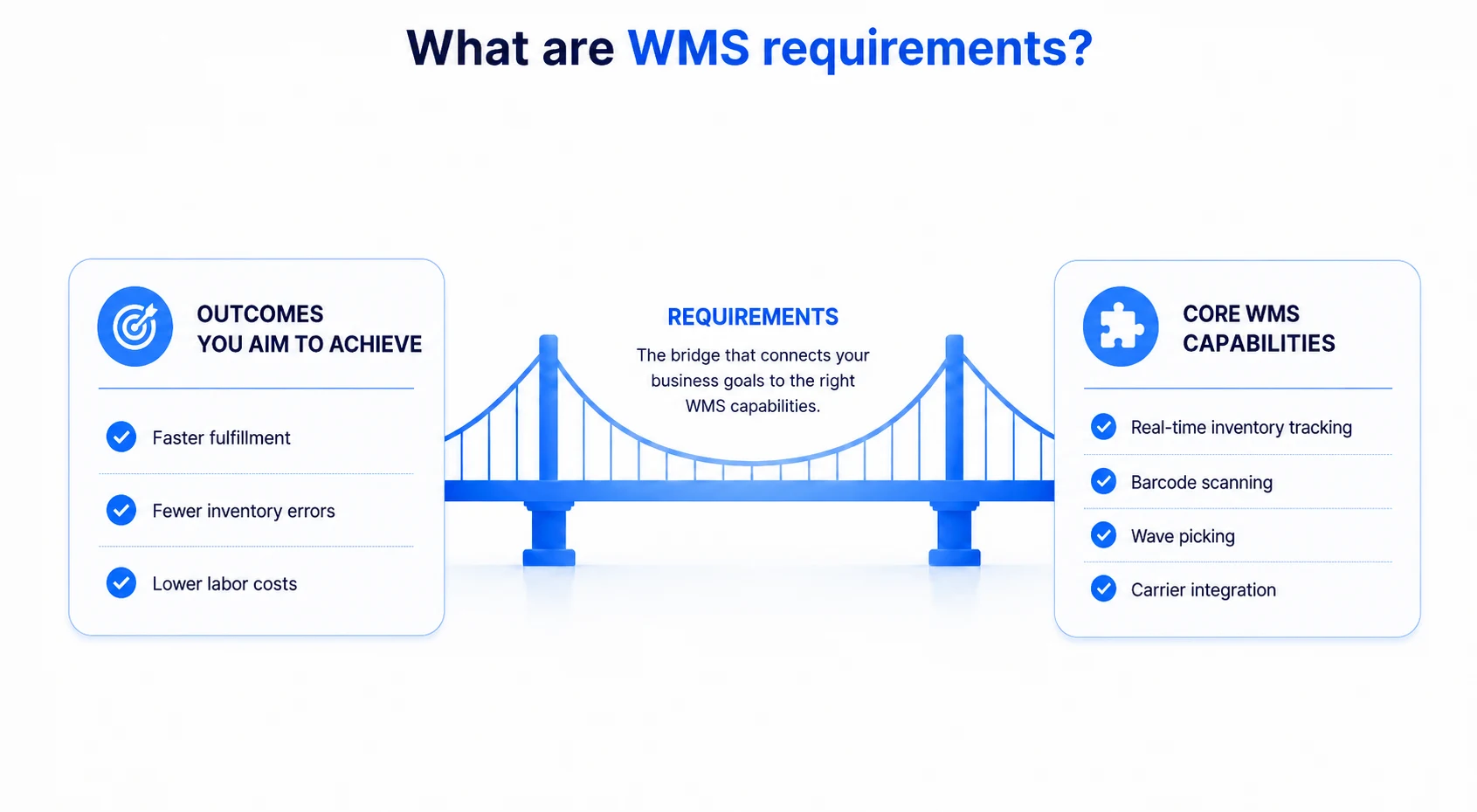
The easiest way to picture them is as a bridge. On one side are the outcomes you're trying to achieve: faster fulfillment, fewer inventory errors, and lower labor costs. On the other are concrete capabilities like real-time inventory tracking, barcode scanning, wave picking, and carrier integration. Requirements are what connect the two, so the system you end up with actually moves the numbers you care about.
Functional requirements describe what the system does; non-functional ones describe how fast, how reliably, and how easily your staff can learn it. Skip the second category, and you'll buy something that technically checks every box and still frustrates everyone who touches it.
What Happens When WMS Requirements Are Not Defined Clearly
When requirements stay fuzzy, the bill comes due after go-live, which is exactly when fixing anything is most expensive. The fallout tends to show up in a few predictable ways:
- Costs you didn't plan for. Missing features get added through customizations and change orders that nobody budgeted.
- Integrations that don't work. Connections you assumed would "just work" don't, so someone reconciles inventory between the WMS and your accounting system by hand.
- A return to spreadsheets. Wherever the software can't automate something, people go back to doing it manually, leaving you with new software and the same old workarounds.
Months in, many teams realize the workarounds are costing them more time than the system they replaced.
WMS Functionality Overview
Before getting into specifics, it helps to see the whole shape of what a warehouse management system handles. At its core, a WMS runs the flow of goods through a building: receiving what comes in, putting it away, keeping inventory management accurate, directing picking and packing, getting orders shipped, and processing whatever comes back. Wrapped around that core are the supporting pieces: reporting and analytics, labor management, and the integrations that tie the warehouse into the wider supply chain.
Everything below breaks those areas into specific requirements you can take into a vendor conversation or hand to a development team.
Core Warehouse Management System Functional Requirements
These are the warehouse management system functional requirements that hold everything else up. If a system is shaky here, no amount of clever reporting makes up for it.
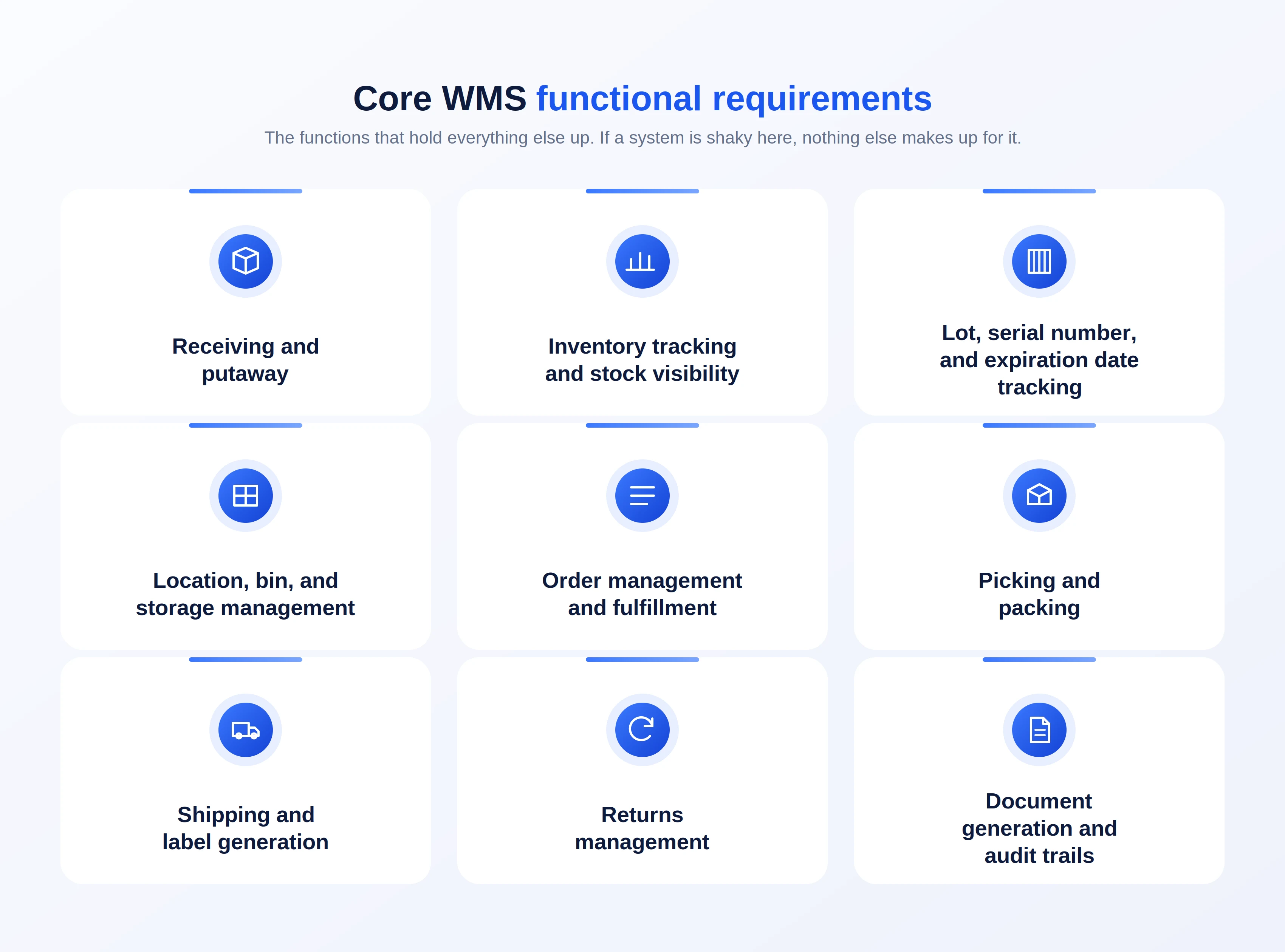
Receiving and putaway
This is where goods enter the system, so it sets the tone for everything downstream. The WMS should check inbound shipments against purchase orders or advance shipping notices, flag discrepancies, and walk receiving staff through the process. Then, putaway logic decides where each item goes, based on velocity, product type, temperature zone, whatever rules you define. Done well, it shortens travel time and keeps your fast movers within easy reach.
Inventory tracking and stock visibility
If you ask warehouse managers why they wanted a WMS in the first place, real-time inventory tracking is usually the answer. Every receipt, transfer, pick, and adjustment should register the moment it happens, giving you stock management you can actually trust across the whole floor. That trust is what lets you promise inventory to customers without crossing your fingers.
Lot, serial number, and expiration date tracking
For anything regulated, perishable, or expensive, traceability isn't optional. The system needs to capture lot and serial numbers at receipt and carry them through every transaction, with support for rotation rules like FEFO so the oldest stock ships first. When a recall or audit lands, this is what saves you.
Location, bin, and storage management
A good system knows your warehouse layout down to the individual bin, so "where is it?" always has an answer. Flexible storage management lets you carve out zones, set capacity limits, and reslot as your demand shifts over the year.
Order management and fulfillment
Order management is the matchmaking layer that connects incoming demand to available stock and choreographs the fulfillment that follows. The system should allocate inventory sensibly, bump urgent orders up the queue, group work efficiently, and give supervisors a clear view of where every order stands. Get this right and order processing speeds up, which your customers feel directly.
Picking and packing
There's no single best way to pick, so the WMS should support several — single order, batch, zone, wave — and steer each order toward the method that suits it. At the packing station, it should confirm contents, suggest a carton, and prompt for any paperwork, catching mistakes before they leave the dock.
Shipping and label generation
Shipping should produce a clean shipping label, generate the carrier documents, and confirm dispatch. With proper carrier integration, rates and tracking numbers come back on their own instead of being typed in by a tired person at 6 p.m.
Returns management
Returns are where a lot of systems quietly fall apart. The WMS should take in returned goods and apply clear disposition rules, restock, refurbish, quarantine, scrap, then update inventory so the good stuff goes back to being available without anyone touching a spreadsheet.
Document generation and audit trails
Finally, the system should spit out the documents your operation runs on — packing slips, bills of lading, compliance forms — and keep an audit trail of who did what, when. Those trails matter for accountability, and they're invaluable the day you need to figure out how something went wrong.
Scanning and Warehouse Tracking Requirements
Accurate data capture is what keeps the whole system honest. Without it, even the most polished WMS will confidently misreport your stock levels.
Barcode scanning
Barcode scanning is the foundation of inventory accuracy. Every item, location, and shipment should be scannable, so a movement gets recorded with a tap instead of being recalled from memory. Standardized identification matters more than people expect here — building on established GS1 barcode standards keeps your codes consistent across carriers and trading partners, which you'll be grateful for the moment you start integrating with anyone external.
RFID support
In high-volume or high-value settings, radio frequency identification earns its place. RFID technology reads many tags at once without line of sight, which makes cycle counting fast and pallet-level tracking practical in ways barcodes can't quite reach.
Mobile scanning devices
Spell out which mobile scanning devices the system has to support — handhelds, wearables, rugged tablets — and insist on an interface built for the warehouse floor. More and more, sensors and Internet of Things devices are feeding the WMS too, from cold-chain temperature monitoring to automatic location updates.
WMS integration requirements
A warehouse management system rarely works in isolation. Most of its value comes from exchanging data automatically with the rest of your stack, and integration gaps are a leading cause of post-launch headaches.
ERP integration
Connecting to your Enterprise Resource Planning system keeps inventory, orders, and financials in agreement. When the WMS and ERP draw from one source of truth, finance and operations stop the weekly argument about whose numbers are right.
E-commerce and marketplace integration
Selling online means the WMS has to plug into your storefronts and marketplaces, with orders flowing in and stock levels flowing out continuously. That's what keeps you from overselling and from making fulfillment promises you can't keep.
TMS and carrier integration
Transportation management and carrier links enable the system to rate-shop, book shipments, and automatically pull tracking data, smoothing the handoff from warehouse to road.
API and EDI support
Open APIs and EDI support quietly decide how painful every future connection will be — to partners, to 3PLs, to whatever tool you adopt next year. Well-documented APIs are a good tell that a vendor built their product to integrate rather than to trap you.
Reporting and Analytics Requirements
You can't fix what you never measure, and this is where warehouse activity turns into actual decisions.
Dashboards and warehouse KPIs
A configurable WMS dashboard should put the KPIs that matter — order accuracy, on-time shipping, dock-to-stock, inventory turns — in front of you at a glance, with room to dig deeper when a number looks off.
Labor productivity tracking
Labor management features track output by task, shift, and person, helping you spread work evenly, set fair standards, and spot where training would pay off.
Forecasting and historical data
Clean historical data feeds demand forecasting and capacity planning, so you stock and staff for what's coming instead of scrambling once it arrives.
Scalability and Customization Requirements
What you need today won't be what you need in three years. Leave room.
Multi-warehouse support
If you run more than one site or plan to, the WMS should manage them all from one place, with shared visibility and the ability to shift inventory between locations.
Flexible workflows and business rules
Your processes are part of what makes you good at this. The system should let you adjust workflows and business rules through configuration, so it bends to your operation rather than the other way around.
User roles and permissions
Roles and permissions should be granular enough that each person sees and does only what their job calls for. That's better for security and for keeping everyone's screen uncluttered.
User-friendly interface
A user-friendly interface cuts training time and error rates. The most capable system on the market does you little good if the floor team finds it baffling, so put usability in the requirements.
How to Define WMS System Requirements Before Implementation
Understanding the categories is the easy part. Turning them into a requirements document that fits your business takes a bit of legwork. Here's a route that works:
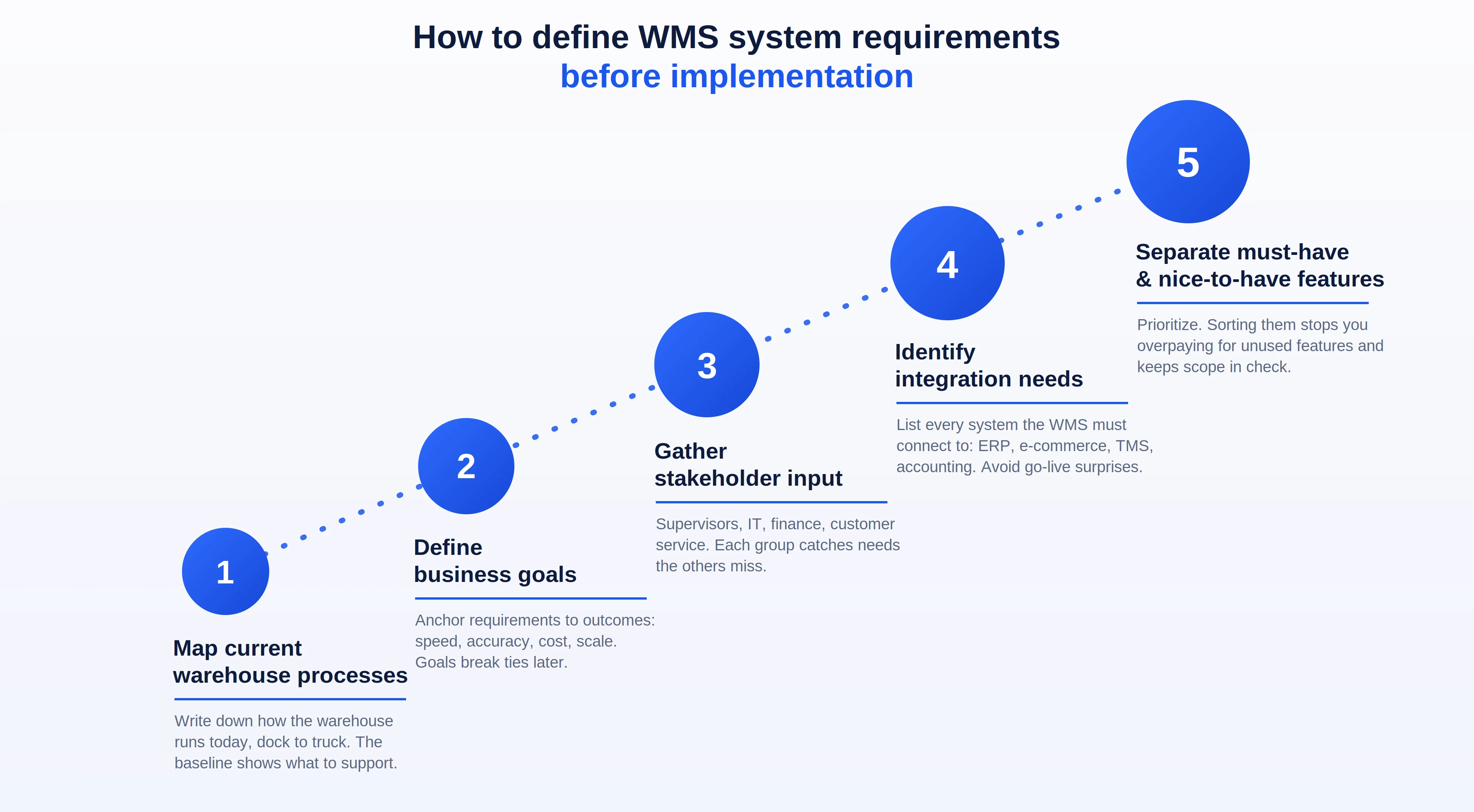
Map current warehouse processes
Start by writing down how your warehouse really operates today — every step, every touch, from the receiving dock to the outbound truck. This baseline shows you what the system genuinely has to support and tends to surface a few bottlenecks worth fixing while you're at it.
Define business goals
Anchor the requirements to outcomes. Faster order fulfillment? Higher accuracy? Lower cost per order? Room to scale? Naming the goals keeps the project pointed in one direction and gives you a tiebreaker when trade-offs come up.
Gather stakeholder input
Bring in the people who'll actually use the thing — supervisors, IT, finance, customer service. Each group notices what the others miss, and pulling them in early makes adoption a lot less painful down the line.
Identify integration needs
List every system the WMS must connect to: ERP, e-commerce, TMS, and accounting. Mapping integration requirements now is how you avoid the ugly surprises that tend to blow up go-live week.
Separate must-have and nice-to-have features
Then prioritize. Sorting requirements into must-haves and nice-to-haves stops you from overpaying for features you'll never open and gives you an honest basis for comparing options and holding scope in check.
Which WMS Requirements May Require Custom Development?
Standard WMS products cover the common cases well, and for many warehouses, they are exactly the right choice. Some operations, however, carry requirements that no packaged system handles cleanly — an unusual fulfillment model, specialized compliance demands, deep ties to external platforms, or a workflow so central to the business that it cannot be reduced to a vendor's preset configuration.
When fitting your operation into a standard product means surrendering the very processes that make it efficient, building your own becomes less a luxury than a sound decision. A custom system can mirror your exact workflow, integrate precisely with your stack, and scale on your terms. This is the reasoning behind custom warehouse management system development — shaping the software around the business rather than the other way around.
The Asabix team recently worked on a project that illustrates this well. SkladUSA, an American-Ukrainian company, helps sellers move goods on marketplaces such as Amazon, eBay, and Etsy, combining storage, warehouse handling, worldwide shipping, payment acceptance, and returns in a single service. No off-the-shelf WMS could accommodate that mix, so the platform was built from the ground up. It unified order management across all three marketplaces in one interface, with tracking numbers pushed back automatically via API, and handled the warehouse side in depth — stock accounting, reservations and in-transit tracking, automatic UPC assignment and labeling, barcode scanning, and storage by shelf, row, and cell.
The system also absorbed needs that a generic product would never carry natively, from multi-provider payment acceptance to carrier-specific compliance documents. The result supports shipments to more than 200 destinations worldwide — a scale and specificity that a standard product would have forced the team to manage by hand.
In the end, the decision comes down to fit and long-term cost. If a standard system meets your must-haves with a light configuration, choose it; there is no need to build from scratch. If meeting them would demand heavy customization, fragile workarounds, or the loss of processes that drive the business, custom development warrants serious consideration.
WMS Functionality Checklist Before Implementation
Use this checklist to assess any WMS, whether purchased or built, before you commit.
- Receiving and putaway: Validates inbound shipments and directs stock to the right locations.
- Inventory tracking: Real-time visibility and dependable inventory control across the facility.
- Lot, serial, and expiration tracking: Full traceability and correct product rotation.
- Order management and fulfillment: Intelligent allocation and smooth order processing end-to-end.
- Picking and packing: Multiple picking strategies with verification to reduce errors.
- Shipping and label generation: Compliant shipping labels and confirmed dispatch.
- Returns management: Clear disposition rules that return serviceable stock automatically.
- Barcode scanning: Standards-based identification for accurate data capture.
- RFID and mobile devices: Fast, hands-free tracking where volume justifies it.
- ERP, e-commerce, and TMS integration: Automatic data sharing across the supply chain.
- API and EDI support: Open, documented connections to partners and 3PLs.
- Reporting and analytics: Dashboards, warehouse KPIs, and labor productivity tracking.
- Scalability: Multi-warehouse support and configurable workflows for future growth.
- Usability and access control: A user-friendly interface with role-based permissions.
Define the requirements before WMS implementation, and your chances of selecting the right warehouse management system or building one that earns its place improve substantially. When a standard product cannot meet your must-haves without forcing a compromise, treat that as your signal to explore custom WMS development built around the way your operation actually runs.
Let's discuss your project
Blog
#0000
Read more articles in our blog
What is PWA: Comprehensive Guide with Code Samples
26 Feb, 2024
Progressive Web Apps are web applications that bring best web and mobile features. PWAs are similar to native apps in functionality and can be used on any device with a web browser.
VIEW ARTICLE
-compress.jpg "Warehouse Management System Requirements: Functional Checklist Before Implementation - Picture №10")
Outsourcing and outstaff: difference and features
20 Jul, 2023
Modern companies often have a need for fast and efficient development of software and other IT projects.
VIEW ARTICLE

Website Development Costs: What to Expect
08 Jan, 2025
Are you curious about the cost of creating a website? Discover how design intricacies, advanced functionality, and the type of site you envision can impact your budget.
VIEW ARTICLE
YII vs Laravel: What is the Best Option for Your Project?
02 Jan, 2024
Thanks to technological development, it is no longer necessary to write PHP code from scratch: there are many frameworks — ready-made models, "templates" for software platforms, among which Yii2 and Laravel became the most popular. In what their difference and which of the frameworks to choose for creating a product? We tell and compare the structures in this material.
VIEW ARTICLE
