





Content:
Published: 10.07.2026
Views: 1611
Most ERP implementation issues are predictable. Projects usually lose momentum not because the ERP system is weak, but because of unclear business processes, inconsistent data, stakeholders not being aligned, or teams that underestimate the work required before go-live. ERP brings together finance, procurement, inventory, manufacturing, logistics, sales, and reporting into a single operational environment. That is why every weak point becomes visible during implementation. If departments use different data rules, rely on spreadsheets, or approve workflows differently, ERP will expose these gaps quickly.
So where do ERP projects usually break down? And what should companies fix before these risks become expensive? Below, our team breaks down the most common ERP implementation challenges and how to mitigate them through stronger planning, cleaner data, better testing, and clearer ownership.
TL;DR
ERP implementation projects rarely fail because of software alone. Most problems come from unclear processes, poor-quality data, unrealistic planning, weak change management, and limited testing before go-live.
To reduce ERP implementation risks, companies should define business goals before choosing a platform, clean data before migration, plan integrations early, involve business users throughout the project, control scope changes, and treat go-live as the start of continuous improvement.
| Project stage | Common challenge | How to reduce the risk |
| Planning | Unclear requirements and unrealistic expectations | Define business objectives, scope, and KPIs before implementation begins. |
| Data migration | Duplicate records and inconsistent business rules | Audit, cleanse, and validate data before migration. |
| Integrations | Legacy systems and incompatible data formats | Design the integration strategy early and define data ownership. |
| User adoption | Resistance to change and limited training | Involve users during the project and provide role-based training. |
| Go-live | Limited testing under real business conditions | Test full business scenarios, integrations, and reporting before launch. |
| Post-launch | Lack of optimization | Track adoption, collect feedback, and continuously improve workflows. |
Why ERP implementation projects are difficult
ERP implementation is challenging because it changes how the entire business operates. A standalone tool may affect one team - ERP affects almost everyone. For example, finance needs accurate order and inventory data; procurement depends on sales forecasts; warehouse teams rely on production planning; management needs reports based on the same source of truth. In brief, when one process fails, the impact spreads across departments.
According to Gartner, ERP is a technology that helps organizations manage and integrate core business processes, including finance, HR, manufacturing, supply chain, services, procurement, and others. This is why ERP should not be treated solely as an IT project. It is a business transformation project with software at the center. Before implementation starts, companies should ask a question: Are we ready to standardize how our business operates? If the answer lacks clarity, the project then needs stronger preparation before beginning technical work.
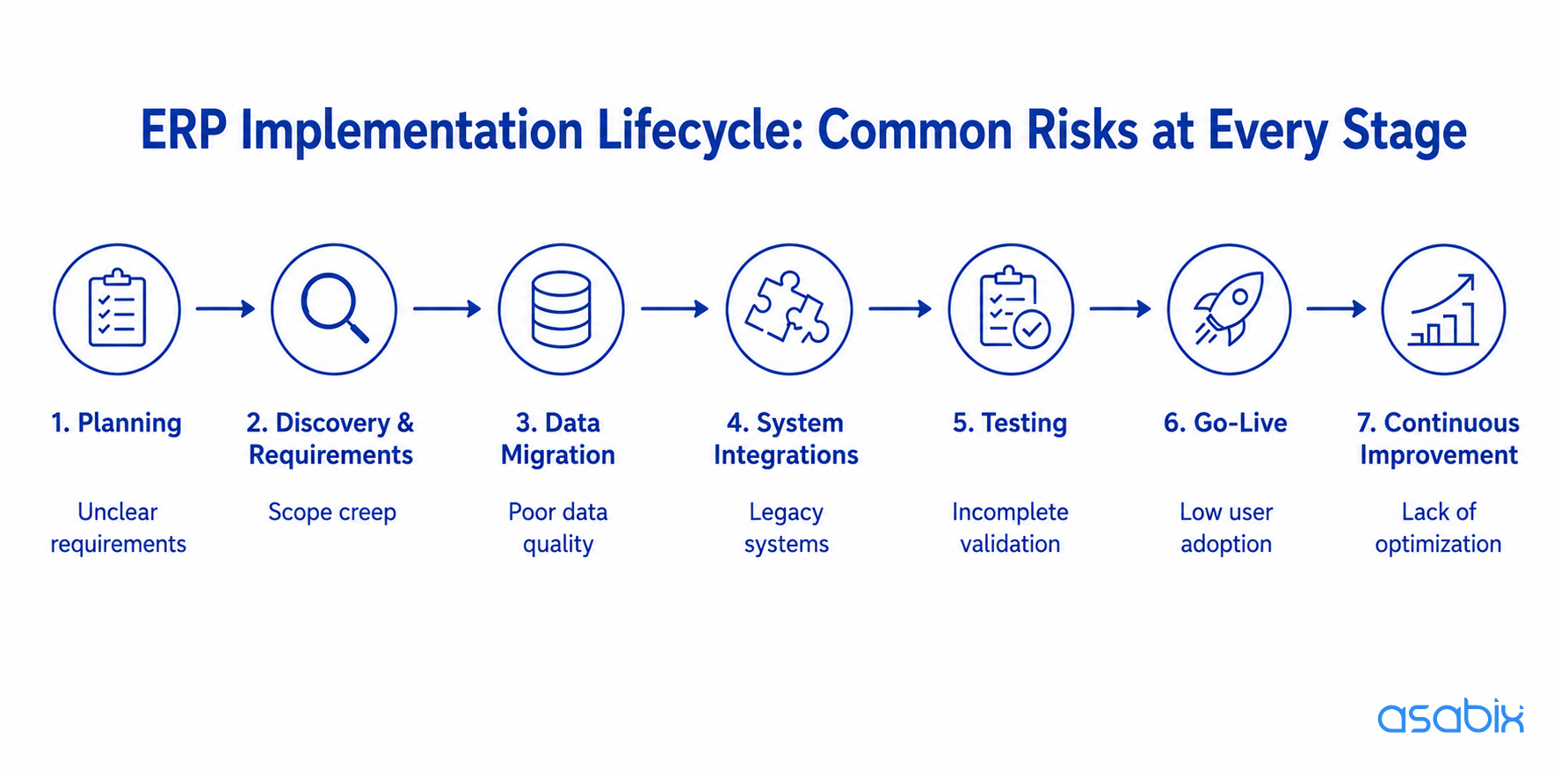
ERP implementation lifecycle
Strategic ERP implementation risks and planning challenges
It’s often the case that ERP projects face problems long before development starts. The first challenges of ERP implementation appear during planning, budgeting, and decision-making.
Poor project planning and unrealistic expectations
Many teams start by comparing ERP features instead of defining business outcomes. They expect the system to improve operations, but they do not clearly define which processes should improve, by how much, and who owns the result.
At Asabix, we approach ERP planning from the business side first. We map current workflows, identify operational bottlenecks, and define measurable objectives. We create a roadmap based on real priorities. You can ask a useful question at this stage: what should become faster, clearer, or easier after ERP implementation? If the answer is vague, the scope is not ready yet.
Underestimating time, budget, and internal resources
ERP implementation requires serious involvement from the client’s team. Tasks in the form of reviewing requirements by department managers, validating workflows by subject matter experts, checking reporting logic by finance, and testing real scenarios by operational teams all take time. Many companies plan the vendor budget but forget to plan internal workload. So as a result, questions stay unanswered and timelines shift.
Realistic ERP planning should include time for workshops, data preparation, internal reviews, user acceptance testing, employee training, and post-launch optimization. These activities determine whether the system reflects real business operations.
Scope creep during ERP implementation
Requirements change during implementation. That is normal. The risk appears when every new request enters the current scope without evaluation.
We reduce these ERP system implementation challenges by separating must-have functionality from future improvements. Each new request should be assessed by business value, effort, and impact on the implementation timeline. This keeps the project controlled without blocking future development.
Lack of executive sponsorship
ERP affects competing priorities: finance may focus on reporting accuracy, warehouse teams - on stock visibility, etc. Without executive sponsorship, these priorities compete rather than align.
Leadership should define decision rules, approve key changes, and keep the project connected to business goals. ERP needs clear ownership, not only technical coordination.
ERP implementation readiness checklist
So, prior to the start of implementation, answer these questions:
- What business problems should ERP solve?
- Are current business processes documented and validated?
- Which systems need integration with ERP?
- Is the data clean enough for migration?
- Who owns each process internally?
- Who approves scope changes?
- How will success be measured after go-live?
Data and ERP integration challenges
Implementation issues related to data and integrations are often the complex ones. The reason is that they reveal how the business actually operates, not how teams describe it during planning.
Data migration complexity
Data migration is more than moving records from old systems into a new one. Business data often lives across accounting software, CRM, WMS, manufacturing tools, spreadsheets, and custom applications. Each source may use different formats, naming rules, and approval logic.
A structured migration process includes source system audit, deduplication, data standardization, test migrations, and final validation. Companies should also prepare a rollback plan in case critical issues with ERP implementation appear during the cutover. The earlier the data work starts, the lower the risk after launch.
Poor data quality and data debt
Many businesses carry years of data debt. Duplicate customers, outdated supplier records, inconsistent SKUs, incomplete inventory data, and conflicting product names become part of everyday work. Migrating this data into ERP makes the problem more visible.
Data quality should be treated as a separate workstream, not a final cleanup task before go-live. Clean data improves reporting accuracy, automation reliability, and user trust from the first day.
Integration issues with existing systems
ERP rarely replaces every tool in the company. Most organizations continue using CRM platforms, WMS, MES, eCommerce systems, BI tools, payroll systems, and external partner portals. If integrations are not planned early, teams face duplicate records, manual imports, synchronization delays, and inconsistent reporting.
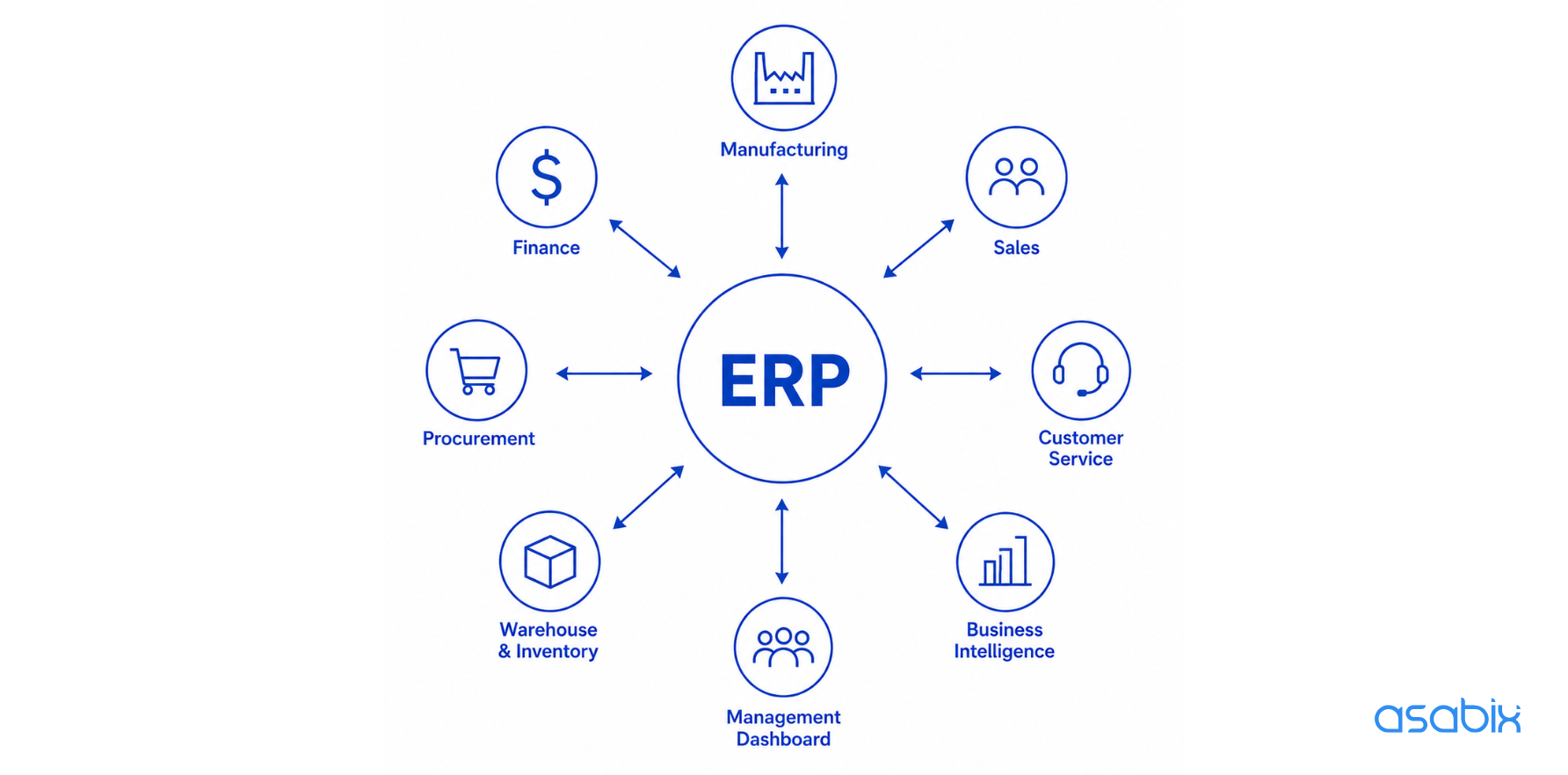
ERP data flow across business departments
We define the integration architecture before development begins. This includes data ownership, API logic, synchronization frequency, validation rules, and error handling. Good integration planning reduces manual work and protects operational continuity.
Data silos and inconsistent business rules
Different departments often use different rules for the same information. ERP implementation exposes these inconsistencies because every team starts working in one shared environment.
A good example is our work on the Artmash manufacturing platform. Before implementation, departments relied on Excel spreadsheets, disconnected production records, and manual reporting. We replaced fragmented workflows with a unified ERP and MES environment that connects order management, production planning, warehouse operations, logistics, and technical documentation. Now departments work with the same operational data instead of maintaining separate versions of the truth.
People and change management challenges
Even the best ERP architecture fails if people avoid using the system. Adoption should be planned from the very beginning, not fixed after launch.
Resistance to change from employees
Employees compare new workflows with familiar routines. If they do not understand why the process is changing, resistance appears quickly. This resistance is usually practical, not emotional. People worry about productivity, responsibility, and mistakes during the transition.
We involve users early through workshops, demos, and feedback sessions. This helps teams understand how ERP supports their daily work and gives them a voice before the system is launched.
Low user adoption after ERP launch
A go-live date does not prove success. The real question is whether teams use ERP for daily operations. Low adoption usually means workflows were not validated properly, training was too generic, or users kept old workarounds because they felt faster. Companies should track adoption after launch. Useful metrics include active users, processes completed within the ERP, support requests, manual spreadsheet usage, and the time required to complete key workflows. Many organizations aim for 70–80% active adoption among core users within the first three months.
Inadequate training and documentation
Employees need to understand where data comes from, who owns each workflow, and how their actions affect other departments. Role-based training, practical scenarios, process documentation, and post-launch knowledge sharing make adoption easier. Clear documentation also reduces onboarding time for new employees and keeps processes consistent as the company grows.
Technical and operational ERP implementation issues
Technical risks usually appear when architecture, testing, security, or customization decisions are rushed. These areas need practical validation before go-live.
System performance and stability issues
It’s often the case that performance problems come from weak infrastructure planning, inefficient database logic, excessive customization, or poorly designed integrations. Performance testing should reflect real business conditions. Teams need to simulate concurrent users, order volumes, reporting load, integration traffic, and peak operational scenarios. This shows how ERP will behave after launch, not only in a controlled test environment.
Security and compliance risks
ERP centralizes sensitive operational, financial, customer, supplier, and employee data. Security should be part of implementation planning from the start. Key requirements include role-based access control, audit logs, encryption, backup and disaster recovery, compliance checks, and security testing before production deployment.
Customization vs. standard ERP functionality
Choosing between standard ERP and custom ERP should depend on business complexity, not only on initial cost. Standard platforms work well for companies with predictable operations and industry-standard workflows. They usually offer faster deployment, lower upfront cost, and vendor-managed updates.
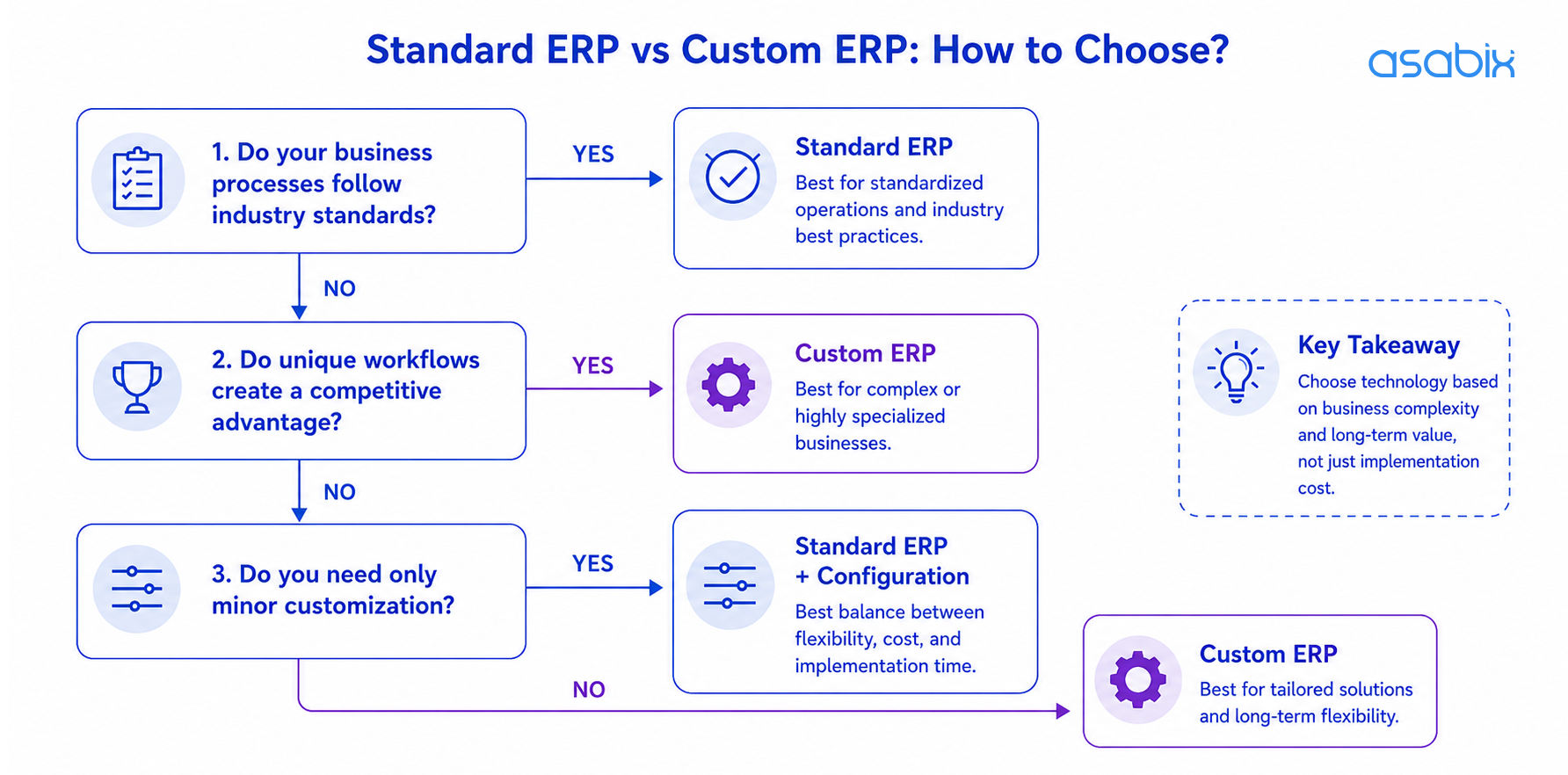
Standard ERP vs custom ERP: how to choose?
Custom ERP software development becomes a stronger option when key processes create competitive advantage or require workflows that standard platforms cannot support without major compromises. In this case, custom development aligns the system with how the business actually operates.
| Consideration | Standard ERP | Custom ERP |
| Initial investment | Lower upfront cost | Higher initial investment |
| Time to implementation | Faster deployment | Longer implementation timeline |
| Business process fit | Based on predefined workflows | Designed around your business processes |
| Integrations | Limited to vendor-supported capabilities | Supports custom APIs and complex integrations |
| Long-term flexibility | Depends on the vendor's roadmap | Evolves with business requirements |
| Best suited for | Standardized operations | Complex or specialized organizations |
Custom ERP also requires stronger ownership. Companies should consider maintenance, product development, internal responsibility, and total cost of ownership. In many cases, standard ERP is the right choice. Custom development delivers value when business complexity justifies it.
Weak testing before go-live
Testing should cover complete business scenarios, not isolated features. Before launch, teams should validate integrations, financial reconciliation, inventory accuracy, reporting, user permissions, and operational workflows. Test migrations, cutover rehearsals, and shadow runs help reduce go-live risk by allowing teams to see how the ERP behaves alongside the current system.
Post-go-live ERP challenges
The very deployment is not the end of ERP implementation. Real optimization starts when people use the system in daily operations.
Lack of support after launch
After go-live, teams discover new reporting needs, workflow gaps, and automation opportunities. Without structured support, these requests become scattered fixes. Post-launch support should follow a clear roadmap. It helps prioritize improvements based on business impact rather than urgency alone.
Reporting and workflow gaps
No implementation predicts every report, dashboard, approval rule, or workflow refinement in advance. These gaps are normal. The key is to separate critical fixes from future improvements. Companies that review ERP performance regularly gain more value than those that treat implementation as a one-time project.
How Asabix helps reduce ERP implementation risks
Every ERP project includes technical, operational, and organizational risks. We reduce those ERP implementation issues and challenges before development begins by analyzing current workflows, validating architecture, planning integrations, and preparing migration strategies.
Our ERP services include:
- ERP discovery workshops and business process analysis.
- Custom ERP software development.
- Legacy system modernization and migration.
- API and third-party integrations.
- Data migration planning and validation.
- QA and performance testing.
- Post-launch support and continuous improvement.
Whether you are replacing spreadsheets, modernizing legacy software, or building a new ERP platform, we help create systems that reflect real operations and scale with the business.
Conclusion
ERP implementation succeeds when technology follows business operations. Companies that invest in process analysis, data quality, stakeholder alignment, testing, and continuous improvement achieve stronger operational visibility and better long-term ROI. Most ERP implementation challenges are predictable. The earlier they are identified, the easier and less expensive they are to resolve.
If you are evaluating ERP platforms, migrating from legacy software, or considering custom ERP development, the right implementation strategy matters from day one. Asabix helps companies assess current processes, design scalable ERP architecture, plan data migration, and build systems around real operational needs.
Book a free consultation with our ERP experts and discuss the best approach for your business.
FAQ
What are the biggest challenges in implementing an ERP system?
The biggest ERP implementation challenges include unclear planning, poor data quality, complex integrations, low user adoption, and weak testing before go-live. Most ERP problems come from business processes and project governance rather than software alone.
What are common ERP implementation failures?
Common failures include uncontrolled scope growth, rushed data migration, slow stakeholder decisions, limited training, and lack of post-launch support. These issues reduce ROI even when the system is technically delivered.
How can companies avoid ERP integration challenges?
Companies reduce the challenges of implementing ERP system by defining measurable goals, validating data before migration, involving business users early, testing full operational scenarios, and improving ERP workflows after launch.
Should we choose standard ERP or custom ERP development?
Standard ERP works best for standardized operations. Custom ERP development is a better fit when complex workflows, unique integrations, or specialized processes are central to how the business creates value.
Let's discuss your project
Blog
#0000
Read more articles in our blog
What is PWA: Comprehensive Guide with Code Samples
26 Feb, 2024
Progressive Web Apps are web applications that bring best web and mobile features. PWAs are similar to native apps in functionality and can be used on any device with a web browser.
VIEW ARTICLE
-compress.jpg "Common ERP Implementation Challenges and How to Avoid Them - Picture №9")
Outsourcing and outstaff: difference and features
20 Jul, 2023
Modern companies often have a need for fast and efficient development of software and other IT projects.
VIEW ARTICLE

Website Development Costs: What to Expect
08 Jan, 2025
Are you curious about the cost of creating a website? Discover how design intricacies, advanced functionality, and the type of site you envision can impact your budget.
VIEW ARTICLE
YII vs Laravel: What is the Best Option for Your Project?
02 Jan, 2024
Thanks to technological development, it is no longer necessary to write PHP code from scratch: there are many frameworks — ready-made models, "templates" for software platforms, among which Yii2 and Laravel became the most popular. In what their difference and which of the frameworks to choose for creating a product? We tell and compare the structures in this material.
VIEW ARTICLE
