





Content:
Published: 28.08.2026
Views: 352
A single order passes through four systems and at least one carrier before it reaches the customer, and every handoff between them is a place where time and accuracy are lost. A line item gets re-keyed, or a stock count stops matching the shelf. Rising volumes make small gaps like these expensive: U.S. retail ecommerce sales reached $340.2 billion in the second quarter of 2026, growing 12.2% year over year against 6.7% for retail overall, according to the U.S. Census Bureau.
Order fulfillment automation is how operations absorb that growth without hiring a person for every extra hundred orders a day. This guide covers the path from checkout to the customer's door, the systems that need to exchange data, and how to roll the change out in stages.
What Order Fulfillment Automation Includes
Order fulfillment automation is a connected set of software and warehouse systems that moves an order from checkout to delivery with minimal manual input. It covers the full sequence, from order capture through returns.
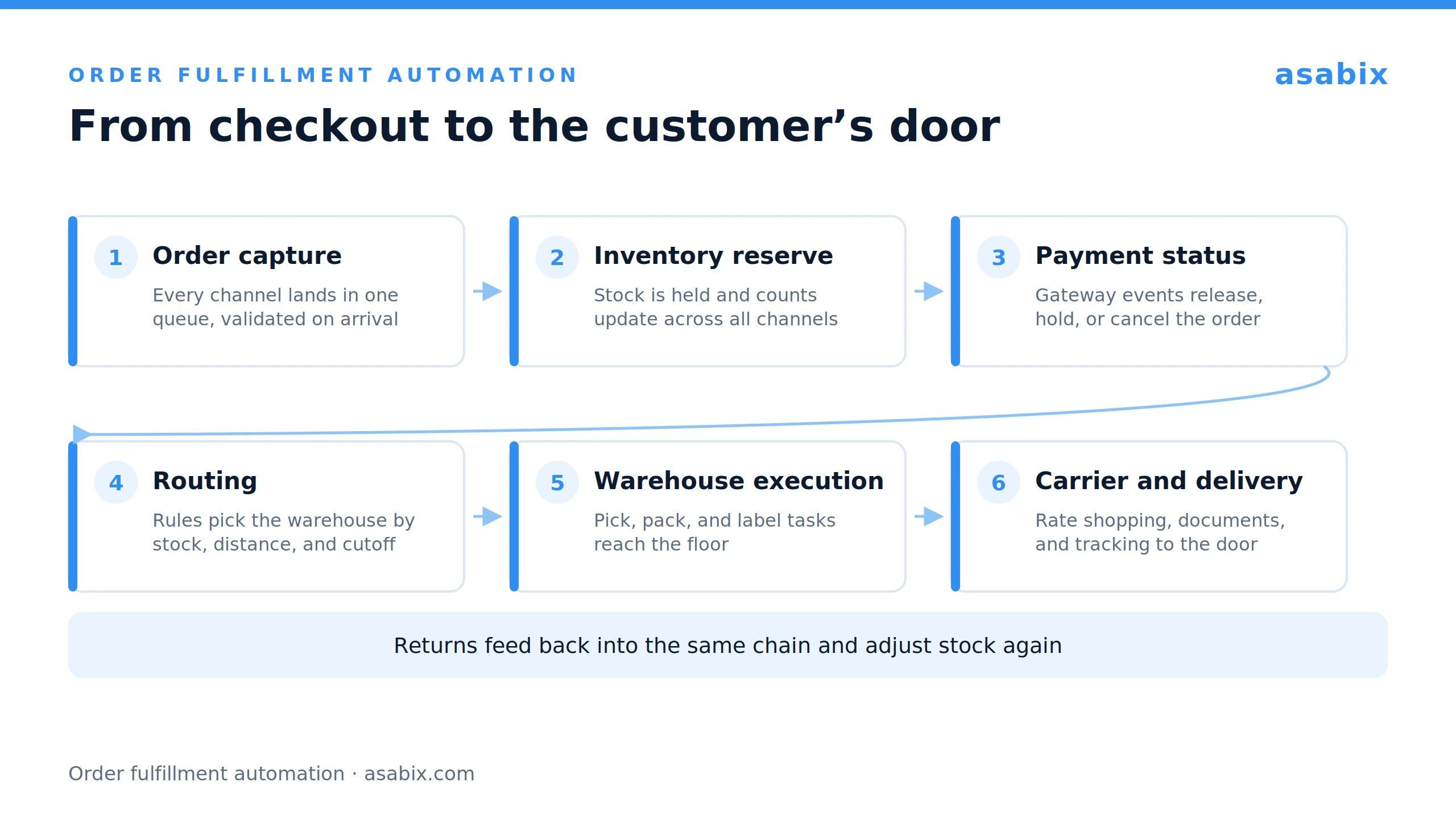
A typical automated path runs like this. An order arrives from a sales channel and is validated against your rules. Stock is reserved, inventory levels update across every channel, and the payment result sets the order status. Routing rules choose the location that will ship it, and the warehouse receives picking and packing tasks. A carrier is selected, a label and shipping documents are generated, and the customer receives tracking updates until delivery. Returns feed back into the same chain.
Each stage is covered below. The value comes from the handoffs between them, which is why integration work decides how much you gain.
Where Manual Fulfillment Creates Bottlenecks
Manual processes rarely fail in an obvious way. They add cost in small amounts that show up later in labor hours and error rates. Five patterns account for most of it.
- Repeated data entry. The same order gets copied from a marketplace dashboard into a spreadsheet, then into the ERP system, then into a warehouse list, and each copy adds another chance for human errors.
- Stock counts that drift. When inventory levels update at the end of a shift, the number on your storefront is always out of date. Overselling follows, and each cancellation costs support time and customer trust.
- Delayed handoffs. Orders that arrive after the daily batch goes to the warehouse wait for the next one, adding hours before anyone picks an item.
- Wrong routing. With no rules in place, the choice of warehouse depends on whoever assigns work that day, so parcels travel farther than they need to or an order splits when one location could have covered it.
- Statuses nobody can see. When an order status lives in an employee's inbox, support cannot answer "where is my order" without calling the warehouse, and slow answers erode customer satisfaction faster than the delay does.
Before automating anything, count how many times a person touches one order between checkout and dispatch. That number is your baseline.
How Businesses Automate Order Processing
Order processing covers everything between checkout and the moment a picking task appears in the warehouse. Automated order processing replaces the copying and checking with rules that run the instant an order lands.
Capturing validated orders from sales channels
Orders arrive from Shopify, Amazon, wholesale portals, and B2B buyers who send a purchase order by email or through EDI, the electronic data interchange format large retailers use. Automation pulls them into one queue in a single format, so the rest of the order processing workflow does not depend on the sales channel.
Validation runs at the same moment: address format, payment method, fraud signals, SKU availability, and quantity limits. Clean orders continue without review, and the rest go to an exception queue with the reason attached.
Synchronizing inventory after each order
Each accepted order reserves stock immediately, and real-time inventory counts are pushed back to every connected channel. Reserved, available, and on-hand quantities stay separate, so the same unit is not promised to two customers.
Inventory management works in the other direction too. When stock drops below a threshold, the system can raise a replenishment request or a purchase order in the ERP, keeping the supply chain aligned with demand.
Linking payment results to order status
Payment gateways send events: authorization, capture, failure, refund, chargeback. Order process automation works best when those events drive order status directly, so no one has to open a payment dashboard before releasing an order. Capture confirmed releases the order to fulfillment, payment pending holds it for retry, and a refund cancels the pick task if nothing has shipped.
How Fulfillment Routing Automation Picks the Right Warehouse
Routing decides where an order is fulfilled from, and weak routing adds shipping cost to every order that leaves the wrong site. A rules engine evaluates stock, distance, warehouse workload, cutoff times, and the promised delivery date, then assigns the order in milliseconds. Fulfillment routing automation also makes those decisions reviewable: the logic belongs to the rules your team can read, edit for peak season, and measure.
Warehouse selection
The system compares locations that can cover the order, weighing distance to the customer, shipping cost, remaining cutoff time, and queue depth. A warehouse holding the item but out of capacity today is not the fastest option.
Order prioritization
Express service levels, aging orders, and shipments near a carrier cutoff move up the queue automatically, which helps hold on-time performance when volume spikes.
Multi-location fulfillment rules
Order routing gets harder when no single site can cover the basket. The system decides whether to split the order across warehouses, hold it until one location can ship complete, backorder a line, or pass it to a dropship supplier.
How Warehouse Fulfillment Automation Directs Work on the Floor
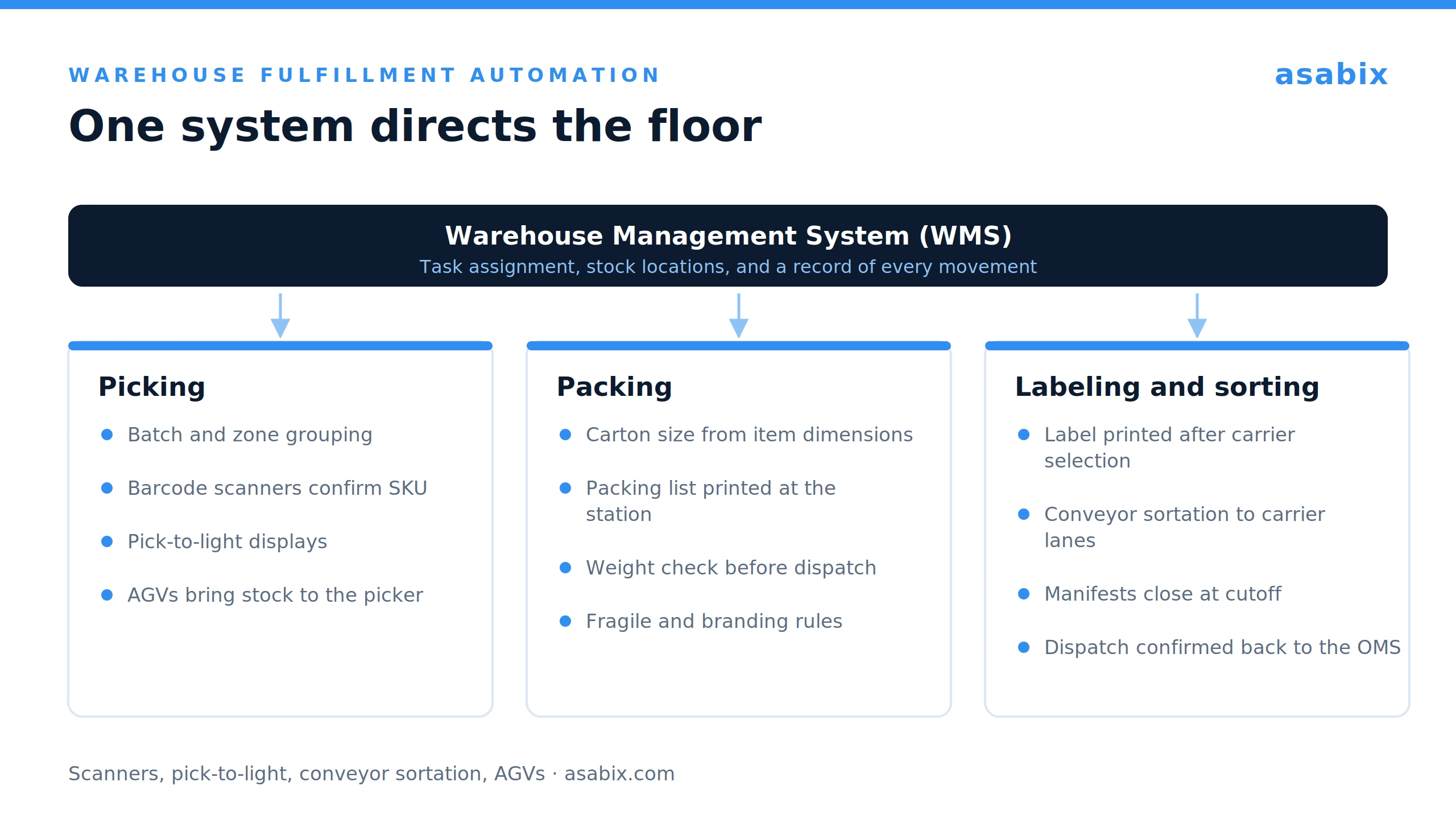
Inside the building, a Warehouse Management System (WMS) directs the work and records what happened. This is where fulfillment automation becomes physical: barcode scanners, pick-to-light displays, conveyor belt sortation, Automated Guided Vehicles (AGVs), and robotic picking cells all take instructions from the same system.
Facility design is already following that direction. Gartner predicts that by 2030, half of new warehouses in developed markets will be designed as robot-centric facilities where humans are optional, with people handling exceptions while automation carries daily operations. Existing warehouses get there one process at a time, and robots and scanners are only as useful as the tasks the WMS gives them.
Operations with client-specific rules or unusual storage logic often outgrow boxed products. In those cases, custom WMS development is the practical route to automating picking, packing, inventory updates, labeling, and daily warehouse tasks around your own storage logic and client rules.
Picking
The WMS groups orders into batches or zones and builds a travel path through the racks. Scanners confirm the right SKU at the right location, pick-to-light displays remove the paper list, and smart technology such as AGVs brings stock to the picker.
Packing
At the pack station, the system suggests carton size from item dimensions, prints the packing list, and checks the final weight against what the order should weigh, which stops a mismatched parcel before it reaches the carrier. Packaging rules for fragile goods or client branding apply automatically.
Carrier selection and rate calculation
Rate shopping compares live carrier rates against the service level promised at checkout, using weight, dimensions, zone, and negotiated pricing. The cheapest carrier that still meets the delivery date wins, and the choice is logged.
Labeling and sorting
The label is generated once carrier selection has run, so destination, service level, and tracking number print in one pass. Labeled parcels move to a conveyor belt that directs them to the correct carrier lane, and manifests close out at cutoff without anyone assembling a list.
Automating Shipping Through Final Delivery
Shipping automation covers the last stretch, from choosing a carrier to confirming the parcel arrived. It is also the stage customers see.
Shipping documentation
Commercial invoices, customs paperwork, and bills of lading are generated from order data that already exists. Cross-border shipping benefits most, because HS tariff codes and declared values come straight from the product catalog.
Tracking and delivery notifications
Carrier webhooks feed real-time tracking events back into the order record, giving support and customers real-time visibility without a phone call. A failed delivery attempt can trigger an alert before the customer notices.
Systems and Integrations Behind Automated Order Fulfillment
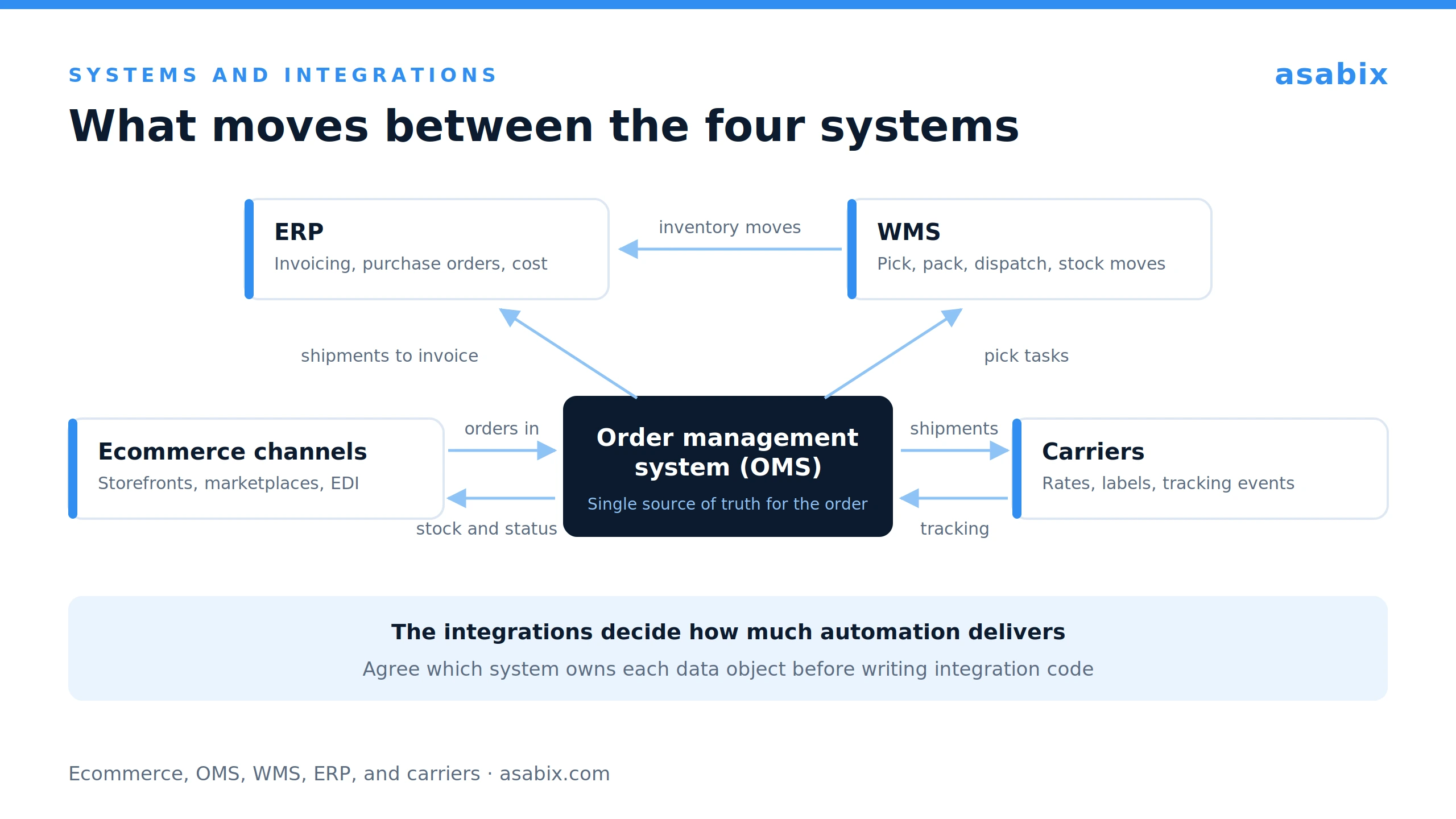
No single product delivers automated order fulfillment on its own. Four roles carry most of the load, and the integrations between them carry the rest. Those roles can also be modules of one custom platform sharing a database, which leaves only the external connections to sales channels and carriers to build.
Order management systems
An order management system (OMS) is the single source of truth for the order itself. It holds channel data, customer details, payment status, routing decisions, and shipment records, then passes fulfillment instructions to the warehouse.
Warehouse management systems
The WMS owns what happens inside the four walls: receiving, putaway, stock locations, pick tasks, packing, and dispatch, and it sends inventory movements back to the OMS and the ERP. When the WMS and the OMS disagree about stock, every delivery date after that point is unreliable.
ERP systems
An enterprise resource planning (ERP) system handles finance, procurement, and reporting. It receives confirmed shipments for invoicing, issues purchase orders for replenishment, and holds the cost data behind fulfillment cost per order.
Ecommerce and carrier integrations
Ecommerce platforms and marketplaces push orders in and receive stock and status updates through APIs or webhooks, while carrier integrations return rates, labels, and tracking events. EDI still carries much of the B2B order data, so budget for it if you sell to large retailers.
How tightly these layers depend on each other is easiest to see from inside a build. We spent about seven months on one for SkladUSA, a cross-border 3PL, and the requirement that shaped every decision was simple to state: a 3PL runs many client stores at once, each with its own SKUs, packing rules, and carriers, and every client expects accurate stock and status data at any moment.
In the fulfillment platform we built for them, sellers connect their Amazon, eBay, Etsy, and Shopify stores, and orders from all of them arrive in one interface. The warehouse module covers receiving, reservations, cell-level storage, automatic UPC assignment, and label generation, while carrier integrations with DHL, FedEx, USPS, and others return rates, labels, and shipping documents without anyone leaving the system. Tracking numbers post back to the marketplace once a shipment is processed, and parcels in transit for more than 14 days are flagged for the team to chase. SkladUSA now ships to more than 200 countries on it.
How to Implement Order Fulfillment Automation
Implementation works best in stages, with each one measured before the next starts. A staged rollout also gives your team time to trust the system.
Map the existing fulfillment process
Document every step an order takes today, including the undocumented workarounds: who touches it, which system holds the data, how long each handoff takes. Teams often find steps that exist only because two systems were never connected.
Identify processes to automate first
Start where volume is high, and rules are stable: order capture, inventory sync, and label generation usually pay back first. Unusual logic, such as client-specific billing or a routing model no boxed product supports, is where custom fulfillment software development makes sense, and it is easier to scope once the simple wins are live.
Connect systems and data
Agree on which system owns each data object before writing integration code, and decide how failed syncs are retried and who gets notified.
Test workflows and exceptions
Exceptions deserve most of the testing time: partial stock, split shipments, address failures, refunds after picking, carrier outages, returns of restocked items. Run both processes in parallel on a limited order set, then widen the scope.
Monitor fulfillment performance
Once live, review performance weekly. Order fulfillment automation shifts effort from doing the work to supervising it, so dashboards and exception queues are where problems get caught.
Key Metrics to Track After Automation
Measure these before you automate order processing so the comparison means something afterward.
- Order cycle time. Hours from order acceptance to carrier handoff, by channel and warehouse.
- Order accuracy. Share of orders shipped complete and correct, with mispicks tracked separately from wrong addresses.
- Fulfillment cost per order. Labor, packaging, and shipping divided by orders shipped, reshipments included.
- On-time shipment rate. Share of orders dispatched within the promised window, by service level.
- Manual touches per order. Human actions an average order still needs, the clearest measure of how much runs on its own.
Track exception volume alongside these five, since a rising rate usually points to a data problem upstream of the warehouse.
Common Order Fulfillment Automation Challenges
Funding for automation is easier to secure than results. At its 2026 Supply Chain Symposium, Gartner reported that more than 80% of supply chain leaders expect funding increases, with AI the top investment, while only 20% of warehousing and transportation AI initiatives meet their goals, and named low data quality as the top barrier to scaling. Four obstacles cause most of the trouble, and each has a practical fix.
Data that breaks the rules
Duplicate SKUs, inconsistent units of measure, and incomplete addresses break logic that looked sound in a workshop, and automation spreads those errors faster than people do.
- Standardize SKU codes, units, and product dimensions before integration starts.
- Validate addresses when the order is captured, before anyone prints a label.
- Give every data object one owning system, so corrections happen in a single place.
Exceptions with nowhere to go
A fully automated process still needs a clear path for orders that fall outside the rules. Exceptions with no visible queue build into a backlog that only shows up in late shipments.
- Route each exception type to a named owner with a target response time.
- Review the queue weekly, since a recurring exception is usually a missing rule.
- Keep exception volume on the same dashboard as your fulfillment metrics.
Slow adoption on the warehouse floor
Staff who were not part of testing tend to keep paper habits alongside the new screens, which leaves two records of the same work.
- Involve pickers and packers in testing alongside supervisors.
- Run short training sessions at the stations where the work happens.
- Keep a feedback channel open in the first weeks so workarounds surface early.
Automating everything at once
Programs that cover every process in one release spend months before anything reaches production, with no return in the meantime.
- Start with one stage that has high volume and stable rules.
- Put it live, measure it, and use the result to argue for the next stage.
- Leave client-specific and low-volume logic for later phases.
Automation Pays Off at the Handoffs
Order fulfillment runs across at least four systems, and most of the delay and error in it appears when data moves between them. Automating one stage in isolation gives a limited return. Connecting capture, inventory, routing, warehouse execution, and shipping into one continuous process is where cycle time and error rates move.
Sequencing matters more than tooling. Map the process as it runs today, clean the data, automate the high-volume steps first, then extend into the exceptions, measuring at each step so the next investment is argued from numbers.
At Asabix, we build fulfillment and warehouse systems around how an operation already works, including the integrations that hold the process together. If you are deciding where automation would pay back first, contact us. Our team will help you map your current process and scope that first stage.
Let's discuss your project
Blog
#0000
Read more articles in our blog
What is PWA: Comprehensive Guide with Code Samples
26 Feb, 2024
Progressive Web Apps are web applications that bring best web and mobile features. PWAs are similar to native apps in functionality and can be used on any device with a web browser.
VIEW ARTICLE
-compress.jpg "How to Automate Order Fulfillment from Processing to Delivery - Picture №9")
Outsourcing and outstaff: difference and features
20 Jul, 2023
Modern companies often have a need for fast and efficient development of software and other IT projects.
VIEW ARTICLE

Website Development Costs: What to Expect
08 Jan, 2025
Are you curious about the cost of creating a website? Discover how design intricacies, advanced functionality, and the type of site you envision can impact your budget.
VIEW ARTICLE
YII vs Laravel: What is the Best Option for Your Project?
02 Jan, 2024
Thanks to technological development, it is no longer necessary to write PHP code from scratch: there are many frameworks — ready-made models, "templates" for software platforms, among which Yii2 and Laravel became the most popular. In what their difference and which of the frameworks to choose for creating a product? We tell and compare the structures in this material.
VIEW ARTICLE
